


Friday, Nov 27: We are not shipping same-day orders.
Need flyers before the holiday? Order by 11:00 AM PT on Wednesday, Nov 25 for same-day printing.
Same Day 11x17 Cardstock Flyers
Thick 14pt Glossy Stock
This is the one to order when an 11x17 sheet has to hold its own shape: stand in a frame, hang on a wall for a month, or sit on a counter without curling at the corners. 14pt glossy cardstock is about the thickness of a postcard, and at tabloid size that rigidity is what separates a poster from a flyer. Order up to 1,000 before 11:00 AM Pacific and we print them the same day at no extra charge.

Why Choose 11x17 Cardstock Flyers and Posters?
Tabloid size on rigid stock, for posters, wall menus, and counter signs that stay up for weeks.
11x17 Poster Printing That Holds Its Shape
Tabloid Cardstock Printing, Twice a Letter Sheet
Fully Opaque on Both Sides
Thick 11x17 Flyers, Printed the Same Day
No Coating, Easier to Recycle
Other Options in This Family


11x17 Cardstock Flyer and Poster Prices
Tabloid size on 14pt glossy cardstock. Every price includes full-color printing.
| Quantity | Front Only | Both Sides |
|---|---|---|
| 50 | $19.99 | $29.99 |
| 100 | $39.99 | $54.99 |
| 200 | $89.99 | $115.99 |
| 300 | $139.99 | $176.99 |
| 400 | $189.99 | $238.99 |
| 500 Popular | $239.99 | $299.99 |
| 600 | $259.99 | $325.99 |
| 700 | $279.99 | $351.99 |
| 800 | $299.99 | $377.99 |
| 900 | $319.99 | $403.99 |
| 1,000 | $339.99 | $429.99 |
| 2,000Next-day ship | $539.99 | $689.99 |
| 3,000Next-day ship | $739.99 | $949.99 |
| 4,000Next-day ship | $939.99 | $1,209.99 |
| 5,000Next-day ship | $1,139.99 | $1,469.99 |
| Quantity | Both Sides |
|---|---|
| 50 | $49.99 |
| 100 | $74.99 |
| 200 | $135.99 |
| 300 | $206.99 |
| 400 | $268.99 |
| 500 Popular | $339.99 |
| 600 | $375.99 |
| 700 | $401.99 |
| 800 | $437.99 |
| 900 | $463.99 |
| 1,000 | $489.99 |
| 2,000Next-day ship | $779.99 |
| 3,000Next-day ship | $1,059.99 |
| 4,000Next-day ship | $1,369.99 |
| 5,000Next-day ship | $1,669.99 |
Twice the area of a letter sheet on cover-weight stock, which is why this is the priciest flyer on the site and why it outlasts every other one. Prices exclude tax.
- Up to 1,000 print the same day. Orders of 2,000 to 5,000 placed by 11:00 AM PT ship the next business day; orders placed after 11:00 AM PT ship in 2 business days. Over 5,000, call +1 (818) 213-5871 for a quote.
- Folding is on double-sided orders only and is priced in the second table. Folded orders are not eligible for same-day printing.
- Printing time does not include transit. See our shipping information for delivery times.
Same Day 11x17 Cardstock Flyer Printing
Large format on thick stock, printed the same day, with no rush fee.
- Pick up or ship. Same-day 11x17 cardstock flyers are ready in Chatsworth between 4:00 and 5:00 PM, or we hand them to the carrier the same day. Shipping information. Cutoff, 1,000-flyer limit and folding rules: turnaround times.
- Files, cutoff rules, and our money-back guarantee are set out in full on our 8.5x11 flyer page.

Folding Options for 11x17 Cardstock Flyers
Two folds, on double-sided orders. Cardstock this heavy is scored first, or it cracks along the crease.


File Setup Guide for 11x17 Cardstock Flyers
Print-ready artwork only.
| Trim Size | 11" × 17" (tabloid / ledger) |
| Document Size with Bleed | 11.15" × 17.15" (0.075" bleed). Standard 1/8" files (11.25" × 17.25") also print without changes. |
| Safe Area | 10.85" × 16.85" (0.075" inside the trim). Keep text, logos, QR codes, and borders inside it. |
| Paper Stock | 14pt Glossy Cardstock |
| Coating | None. No aqueous coating or thermal lamination |
| Color Mode | CMYK only |
| Resolution | 300 DPI or higher |
| Fonts | All fonts outlined before saving, including PDFs |
| Effects & Transparency | Rasterize all transparency, shadows, and effects |
| Accepted Formats | PDF, JPG, PNG, Adobe Illustrator (AI) |
How Same Day 11x17 Cardstock Printing Works
From upload to pickup in 4 steps.
11x17 Cardstock Flyer and Poster Printing FAQ
Rigidity, poster use, folding, and ordering.
Can I use these for 11x17 poster printing and put them in a frame?
Yes, and it is the most common use. 14pt holds a straight edge, so it stands in a frame, mounts to a wall, and does not curl at the corners the way text-weight paper does at this size. Frames are not included.
How thick is 14pt glossy cardstock?
14pt means 0.014 inches, about the thickness of a postcard. The difference from our 100lb gloss 11x17 is easy to feel: the gloss sheet bends under its own weight at this size, and the cardstock does not.
Will the back side show through on double-sided flyers?
No. 14pt cardstock is fully opaque, so a dark background or a photo on the back will not ghost through to the front. On a wall-mounted double-sided menu that is what keeps the front readable.
Can 11x17 cardstock be folded without cracking?
Yes, because we score every fold line before folding. At 14pt an unscored fold will crack along the crease, which is why pressing it yourself is a bad idea.
Half fold finishes at letter size, 8.5" × 11". Tri-fold gives six panels. Folding is double-sided only and adds 1 to 2 business days.
Do you add aqueous coating or lamination?
No. The gloss comes from the stock itself and we add nothing on top after printing. Both coating and lamination keep paper out of the recycling stream.
How many 11x17 cardstock flyers can I order?
From 50 to 5,000. Up to 1,000 print the same day. Orders of 2,000 to 5,000 placed by 11:00 AM PT ship the next business day; orders placed after 11:00 AM PT ship in 2 business days. For more than 5,000, call +1 (818) 213-5871.
What resolution does artwork need at this size?
300 DPI at the finished size, roughly 3,300 by 5,100 pixels. Build the artboard at 11.15" × 17.15" rather than scaling up a letter-size design.
Can I use the standard 1/8" bleed?
Yes. Our spec is 0.075", but a file built to the US standard 1/8" bleed prints without any changes. We trim to a tighter tolerance, which is why our own bleed can be smaller.
What if my 11x17 cardstock flyers arrive damaged?
Send us a photo through web chat and we will reprint and reship as quickly as possible. A stack of 11x17 cardstock flyers is heavy, so corners can get bent in transit despite the reinforced packing.
Design Templates That Make Every File Print-Ready
Download free design templates for all RedPrinting products. Each template includes the correct trim size, bleed, and safe margin, so your artwork prints exactly the way you designed it.
Sticker Templates
Individually cut stickers in every shape and size, plus multi-design sticker sheets.
Business Card Templates
Standard, mini, and square formats for every card design.
Flyer & Poster Templates
From handout flyers to large-format posters, print-ready at every size.
How to Use a Template
Four steps from download to a print-ready file.
Artwork Guidelines That Get
Every File Print-Ready
Every file submitted to RedPrinting is reviewed by a real person before it goes to press. This guide walks you through file formats, resolution, bleed, and cut lines, so your stickers, labels, and cards come out exactly the way you designed them.
We Print the File You Send
Design services are not offered. We print your artwork as supplied, optimized for press.
We print the file you upload. We don't redesign artwork, edit your text, or build print files from scratch, which is part of how we keep prices low and turnaround fast. What we do is prepare your file for the press: we check the size, bleed, and resolution, and make the technical adjustments needed for a clean print.
If a file cannot be printed as it is, we contact you by text, email, or both and ask for a corrected file. If we don't receive a print-ready file within 3 business days, we cancel the order and issue a full refund.
The Three Lines on Every Template
Understand these and your file will cut clean every time.

Accepted File Formats
Vector files give the sharpest results, but we accept high-resolution raster files too.
| Format | Type | Best For | Recommended |
|---|---|---|---|
| AI | Vector | Logos, text, line art, custom shapes | Best |
| Vector | Print-ready files with fonts outlined | Best | |
| EPS | Vector | Legacy vector artwork | Best |
| PSD | Raster | Layered photo-based designs | Good |
| PNG | Raster | Designs needing a transparent background | Good |
| JPG | Raster | Photographs and full-color images | Good |
| TIFF | Raster | High-quality scanned or photo artwork | Good |

- Outline your fonts: Convert all text to outlines or curves so typefaces render correctly on our end.
- Use CMYK color mode: Printing is a CMYK process. RGB files are converted automatically, and bright neon or vivid blues may shift slightly.
- Flatten transparency: Complex transparency and drop shadows can behave unpredictably; flatten them before exporting.
- Embed or attach linked images: Missing links are the most common reason a file gets sent back.
Image Resolution
300 DPI at final print size is the target.
Resolution is measured at the size the artwork will actually be printed. A 300 DPI image looks crisp on a 2-inch sticker but turns soft when stretched across a 24-inch poster. Always check the pixel dimensions against the finished size, not against how the file looks on screen.
Web images pulled from a website or social media are usually 72 DPI, which is roughly a quarter of the detail we need. Enlarging a low-resolution file doesn't add detail back. It only makes the softness more visible.
Low-resolution artwork? If your piece still reads clearly in print, we print it. If the text would be unreadable, we contact you and ask for a higher-resolution file.

Choosing Your Material
Where the sticker will live decides which stock to use.
- Waterproof and tear-resistant
- Resists fading from sun and weather
- Holds up on bottles, laptops, and cars
- Higher cost per sticker
- Thin, smooth, and easy to write on
- Noticeably lower cost per sticker
- Ideal for packaging, boxes, and mailers
- Not water- or weather-resistant
Clear stickers are printed on transparent vinyl, so the surface underneath becomes part of the design. They're waterproof, tear-resistant, and work beautifully on glass bottles, cups, laptops, and windows where a white sticker edge would look out of place.
Because there's no white backing, light colors and white ink behave differently than they do on paper. Designs with bold shapes, dark colors, or deliberate negative space tend to read best.
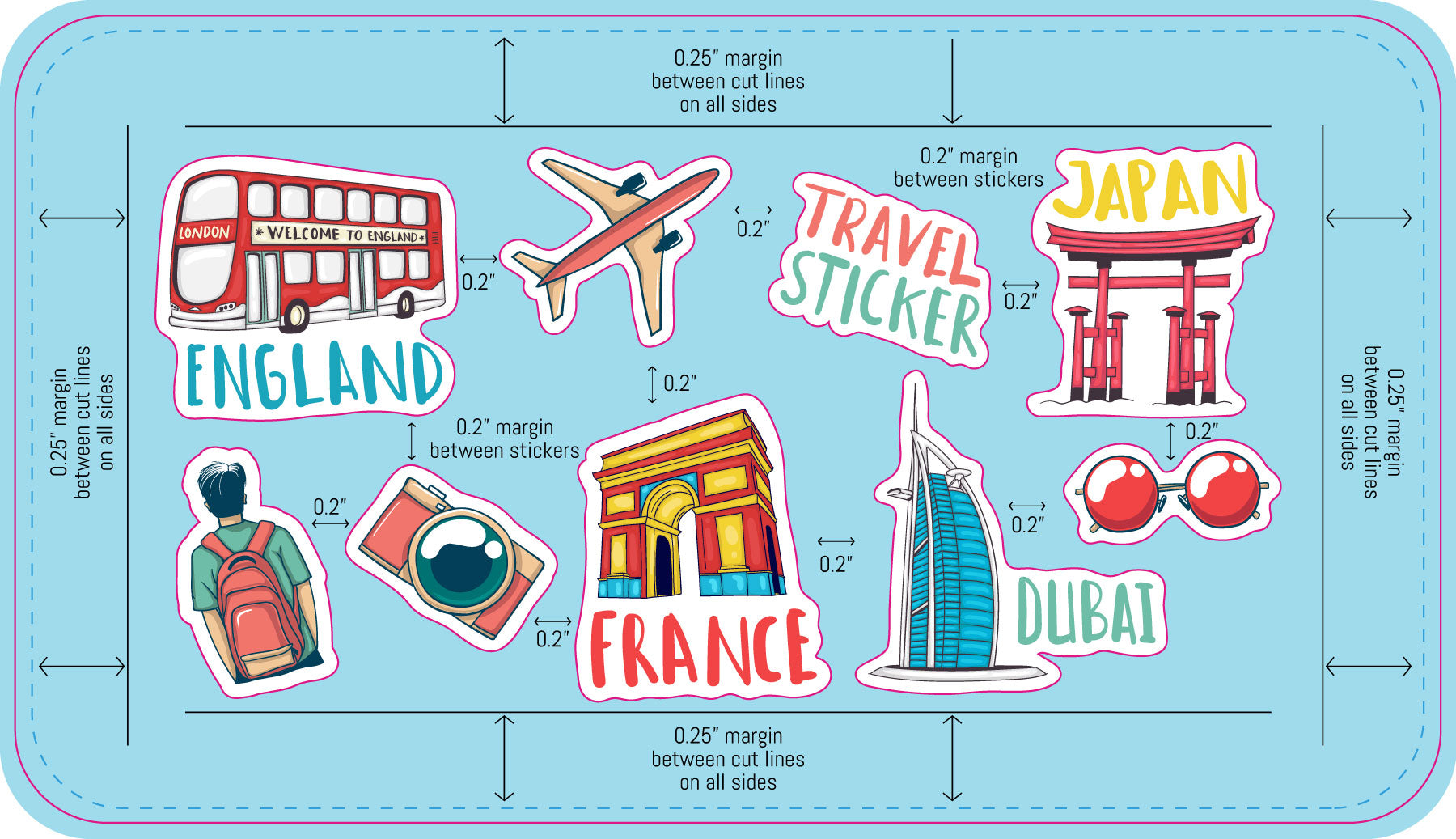
Setting Up Sticker Sheets
Multiple designs and sizes on a single sheet.
Sticker sheets let you print several different designs together on one backing sheet. Our sheet templates come pre-populated with placeholder artwork that you replace with your own files.
Common Mistakes to Avoid
The issues that most often send a file back for revision.
- No bleed on the background: Artwork that stops at the die line leaves white edges when the cut shifts. Extend it 0.075 inch past the finished edge, or 1/8 inch for large-format products.
- Text too close to the edge: Anything outside the safe area can be trimmed off. Pull text and logos at least 0.075 inch inside the die line, or 1/8 inch for large-format products.
- Low-resolution images: Artwork saved from a website prints soft and pixelated. Work from the original high-resolution file whenever possible.
- Live fonts not outlined: Fonts we don't have installed get substituted. Convert all type to outlines before exporting.
- RGB color mode: Vivid RGB colors can't always be matched in CMYK. Design in CMYK to see accurate colors from the start.
- Die line left in the artwork: The cut line is a guide, not a design element. Remove it or keep it on its own separate layer.
- Wrong template size: Make sure the template you downloaded matches the size you actually ordered.
From File to Finished Print
What happens after you place your order.