Skip to product information
1 of 3

RedPrinting

Removable Window Decals Printing | Avery Dennison Removable Adhesive | Free Squeegee

Removable Window Decals Printing | Avery Dennison Removable Adhesive | Free Squeegee

Regular price $0.00
Regular price Sale price $0.00
Sale Sold out
View full details

Custom Removable Window Decals
Just $1 per Square Foot

Professional Removable Window Decals printing on premium Avery Dennison adhesive PVC — the most popular material for window graphics, storefront signage, and promotional decals. Printed on a 4ft wide roll with 10-color EPSON solvent ink, then cleanly removable without residue.

💰
$1 per sq ft
Fixed 4ft Width Pricing
🧹
Removable Adhesive
Avery Dennison PVC
🖨️
10-Color EPSON
SureColor SC-80680L
✂️
Free Cutting
Orders 15 sq ft+


Why Choose Our Removable Vinyl Decals?

Professional-grade window decals designed for clean removal — not cheap permanent sticker material.

01
Avery Dennison Removable Adhesive PVC
Printed exclusively on premium Avery Dennison removable windows decal adhesive vinyl. Applies cleanly to glass, smooth metal, and painted surfaces — and removes without leaving residue when you're done.
02
The #1 Choice for Window Graphics
This removable adhesive PVC is the most commonly used material for promotional removable window decals and storefront graphics. It offers excellent print resolution, applies easily, provides strong UV resistance, and removes cleanly.
03
Industry-Leading Pricing — $1 per sq ft
Just $1 per square foot based on a fixed 4ft print width — optimized for wide-format production. Optional lamination available at +$0.30/sq ft with Avery Dennison matching film to minimize curling and edge lift.
04
10-Color EPSON SureColor SC-80680L
Exceptional color depth and smooth gradients beyond standard CMYK printing. Printed on 50" media and trimmed to a final 4ft (48") width for true large-format output.
05
Free Cutting on Orders 15 sq ft+
Orders 15 square feet and above include cutting at no additional cost. Orders below 15 sq ft require an additional cutting fee due to handling and setup time — call us for pricing.
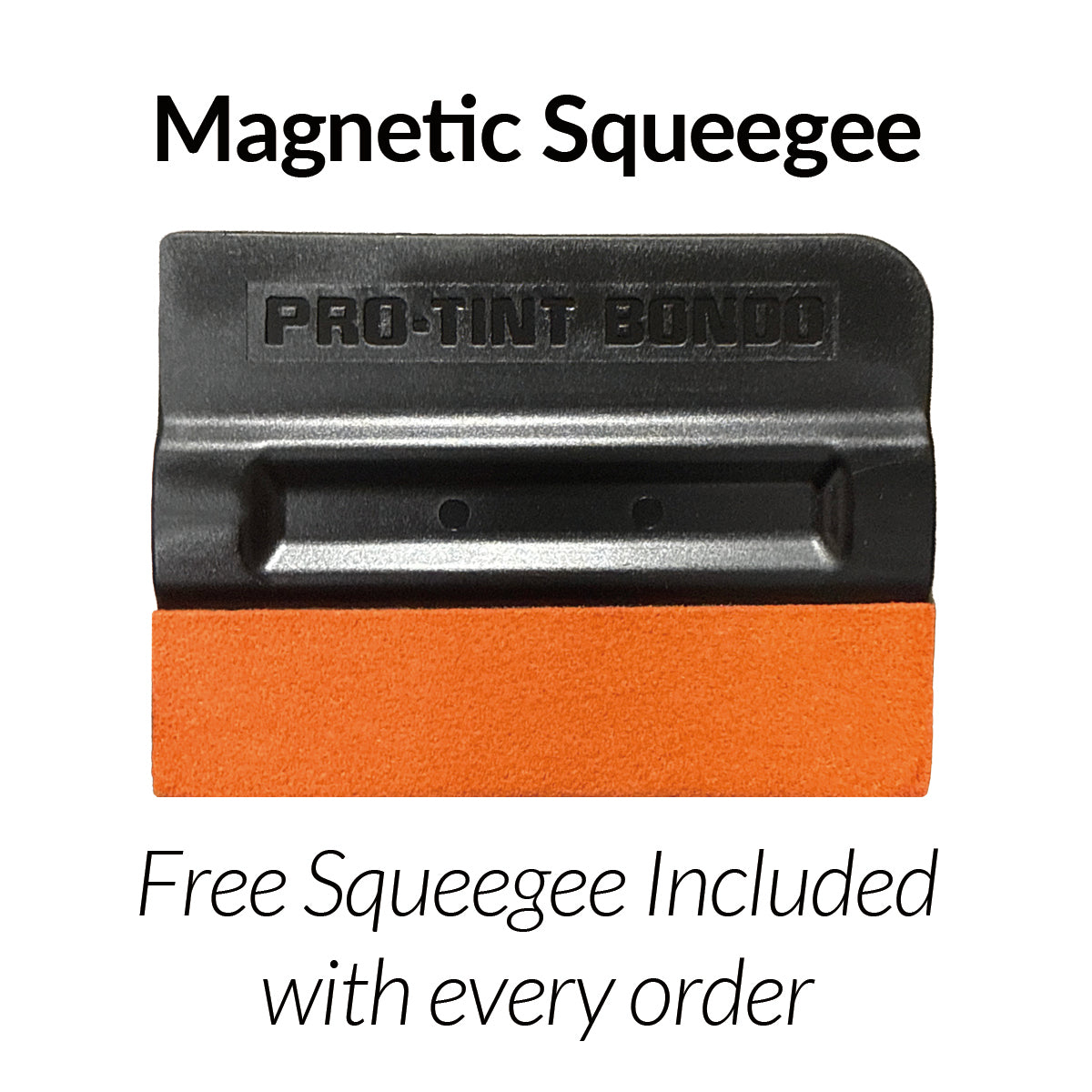
Free premium magnetic squeegee
Included with every order

Free Premium Magnetic Squeegee

Soft, flexible high-grade plastic body for smooth, even pressure
Faux suede chamois surface — gentle on vinyl, no scratches
Magnetic on both ends — perfect bubble-free application every time

A $5 value — complimentary with your decal order, no minimum required.
Need extras? Buy more here →


Pricing

Simple, transparent pricing based on a fixed 4ft print width.

Vinyl + Lamination
Avery Dennison matching film
$1.30
per square foot
Base $1.00 + $0.30 lamination
Min. charge: 4ft length ($20.80)
Design Size → Order Length Price
Example 1
1ft × 1ft design → enter 1 ft length
4ft × 1ft = $4
Example 2
3ft × 1ft design → enter 1 ft length
4ft × 1ft = $4
Example 3
4ft × 6ft design → enter 6 ft length
4ft × 6ft = $24
💡 Cost-Saving Tip
The width is always 4ft — you only pay for the length. For narrow designs, we strongly recommend placing multiple graphics side by side (ganging) in one file to maximize print area and reduce cost.

Specifications

Professional removable vinyl built for large-format applications.

Material Avery Dennison removable adhesive PVC vinyl
Print Width Fixed 4ft (48") — printed on 50" media, trimmed to 48"
Pricing $1.00 per sq ft (based on 4ft width × ordered length)
Lamination Optional +$0.30/sq ft — Avery Dennison matching shrink-rate film
Printer EPSON SureColor SC-80680L (10-color)
Adhesive Removable — clean removal without residue
Outdoor Durability Up to 12 months (lamination recommended for UV protection)
Minimum Order 4ft length (no minimum quantity)
Print Tolerance Up to ±1/2" per 72" length (1/4" print increments)


File Setup Guide

Submit print-ready files for the best results.

Color Mode CMYK
Resolution 300 DPI
Scale 1:1 (actual size)
Fonts Outlined / converted to paths
Accepted Formats PDF, AI, EPS, high-resolution TIFF
📏 Print Length Tolerance
Due to the nature of large-format roll production, minor length variation may occur. Printing is processed in 1/4-inch increments, and overlapping sections may cause slight variation. For a 72" print, maximum tolerance is up to ±1/2 inch. If precise final length is critical, allow extra length and trim after installation.


How It Works

From upload to installation in 4 simple steps.

1
Choose Length
Enter the print length you need. Width is fixed at 4ft. Add lamination if desired.
2
Upload Artwork
Submit print-ready files: CMYK, 300 DPI, outlined fonts. Gang designs to save.
3
We Print & Ship
Printed with 10-color EPSON ink. Free cutting on 15 sq ft+. Free squeegee included.
4
Apply & Display
Apply to glass, metal, or smooth surfaces with the included squeegee. Removes cleanly.


Frequently Asked Questions

Common questions about our removable vinyl decals.

Can this vinyl be used on vehicles?
Yes. It's suitable for vehicle windows and smooth painted metal surfaces. However, it's not recommended for curves or textured plastics.
Is it suitable for outdoor use?
Yes — designed for short- to mid-term outdoor use, typically up to 12 months. Lamination is recommended for extended UV and weather resistance.
Will it leave residue when removed?
Under normal conditions, no residue is expected when removed properly. The Avery Dennison removable adhesive is specifically designed for clean removal.
Is this permanent vinyl?
No. This product uses removable adhesive PVC only. It's designed for clean removal after application. Permanent vinyl will be offered as a separate product.
Can it be repositioned after applying?
"Removable" means it peels off cleanly, but repositioning once applied is difficult. For adjustability during installation, use soapy water to slide the vinyl into position before pressing down.
What surfaces work best?
Glass, painted metal, smooth plastic, and finished panels. The adhesive bonds best to clean, smooth, non-porous surfaces.


Popular Applications

Removable vinyl decals for every commercial and creative need.

🪟 Storefront Window Graphics 🏢 Office & Lobby Signage 📣 Promotional & Sale Decals 🚗 Vehicle Window Decals 🍽️ Restaurant Menu Boards 🏪 Retail Display Graphics 🏨 Hotel & Hospitality 🏠 Real Estate Signage 🎪 Event & Trade Show 🏫 School & Campus ⛪ Church & Community 🖼️ Any Smooth Surface Graphic


At a Glance

Everything you need to know.

  • Avery Dennison Removable Adhesive PVC – Premium vinyl, clean removal, no residue
  • $1 per sq ft – Fixed 4ft width pricing, industry-leading large-format rates
  • Optional Lamination +$0.30/sq ft – Avery Dennison matching film to prevent curling and edge lift
  • 10-Color EPSON SureColor SC-80680L – Exceptional color depth beyond standard CMYK
  • Free Cutting on 15 sq ft+ – Additional cutting fee applies below 15 sq ft
  • Free Squeegee Included – Complimentary application tool with every order
  • Up to 12 Months Outdoor Durability – Lamination recommended for UV protection
☑️ Before You Order
Please confirm the following to avoid delays and ensure accurate pricing:
  • I understand pricing is based on a fixed 4ft (48") print width, regardless of artwork width.
  • I understand the minimum charge is 4ft print length ($18 without lamination / $20.80 with lamination).
  • I understand print length may vary up to ±1/2" per 72" due to production overlap.
  • I will use the included squeegee with a microfiber cloth to prevent surface marks.
  • I confirm my file is print-ready: CMYK, 300 DPI, and outlined fonts.

Free Design Templates

Design Templates That Make
Every File Print-Ready

Download free design templates for all RedPrinting products. Each template includes the correct trim size, bleed, and safe margin, so your artwork prints exactly the way you designed it.

📐
Before you start: Download the template for your product and size, then set up your artwork following our Artwork Guidelines. Correct file setup means faster production and no delays.

Sticker Templates

Individually cut stickers in every shape and size, plus multi-design sticker sheets.

Round Stickers
Order Now
Download by Size
Square Stickers
Order Now
Download by Size
🔲Rounded Square Stickers
Order Now
Download by Size
Rectangle Stickers
Order Now
Download by Size
Rounded Rectangle Stickers
Order Now
Download by Size
Oval Stickers
Order Now
Download by Size
📄Sticker Sheets
Order Now

Business Card Templates

Standard, mini, and square formats for every card design.

💳Business Cards
Order Now

Flyer & Poster Templates

From handout flyers to large-format posters, print-ready at every size.

📰Flyers
Order Now
Download by Size
8.5" × 11" 5.5" × 8.5" 11" × 17"

Artwork Guidelines

Artwork Guidelines That Get
Every File Print-Ready

Every file submitted to RedPrinting is reviewed by a real person before it goes to press. This guide walks you through file formats, resolution, bleed, and cut lines — so your stickers, labels, and cards come out exactly the way you designed them.

👁️
Human File Review
Every Order, No Exceptions
🎁
Free Artwork Setup
Just Send Us an Image
🔍
300 DPI
Recommended Resolution
📐
0.075" Bleed
Tighter Than Industry Standard

Not a Designer? We'll Handle It

Free artwork setup is included with every order.

You don't need design software or print experience to order from us. Send us your image in any common format and our in-house design team will build the print file for you — adding bleed, positioning the cut line, and adjusting the resolution at no extra charge.

If your artwork needs a change we can't make on our own, we'll email you before printing. Nothing goes to press without your approval.

💡
Prefer to set up the file yourself? Start from one of our free product templates — trim, bleed, and safe area are already in place, so all you have to do is drop your design in.

The Three Lines on Every Template

Understand these and your file will cut clean every time.

Sticker artwork template showing bleed line, die line, and safe line
Bleed line (outermost), die line (the finished edge), and safe line (innermost).

Bleed Line — extend artwork to here
The outer boundary, 0.075 inch beyond the finished edge. Any background color, pattern, or image that should reach the edge of your sticker must extend all the way to this line. Bleed absorbs the small shift that happens during cutting, so no white slivers appear along the border. Most printers ask for a full 1/8 inch — our cutting tolerance is tight enough that 0.075 inch is all we need, which leaves you more usable design space.

Die Line — the finished edge
This is where the blade cuts. The die line defines the actual size and shape of your finished sticker. It's a guide only — never print the die line itself as part of your artwork.

Safe Line — keep text and logos inside
The inner boundary, 0.075 inch inside the finished edge. Anything you can't afford to lose — text, logos, QR codes, borders, contact details — belongs entirely inside this area. Elements placed too close to the die line risk being clipped.
⚠️
Watch out for thin borders. A frame or outline that hugs the die line will look uneven if the cut shifts even slightly. Either pull the border well inside the safe area, or let the design bleed off the edge entirely.
📏
Using a template from another printer? Files built with a larger 1/8 inch bleed work here without any changes — extra bleed is simply trimmed away. Just make sure nothing important sits outside the safe area.

Accepted File Formats

Vector files give the sharpest results, but we accept high-resolution raster files too.

Format Type Best For Recommended
AI Vector Logos, text, line art, custom shapes Best
PDF Vector Print-ready files with fonts outlined Best
EPS Vector Legacy vector artwork Best
PSD Raster Layered photo-based designs Good
PNG Raster Designs needing a transparent background Good
JPG Raster Photographs and full-color images Good
TIFF Raster High-quality scanned or photo artwork Good
Accepted artwork file formats for RedPrinting
  • Outline your fonts – Convert all text to outlines or curves so typefaces render correctly on our end.
  • Use CMYK color mode – Printing is a CMYK process. RGB files are converted automatically, and bright neon or vivid blues may shift slightly.
  • Flatten transparency – Complex transparency and drop shadows can behave unpredictably; flatten them before exporting.
  • Embed or attach linked images – Missing links are the most common reason a file gets sent back.

Image Resolution

300 DPI at final print size is the target.

Resolution is measured at the size the artwork will actually be printed. A 300 DPI image looks crisp on a 2-inch sticker but turns soft when stretched across a 24-inch poster. Always check the pixel dimensions against the finished size, not against how the file looks on screen.

Web images pulled from a website or social media are usually 72 DPI, which is roughly a quarter of the detail we need. Enlarging a low-resolution file doesn't add detail back — it only makes the softness more visible.

Low-quality artwork? Send it anyway. Our designers will do everything possible to bring it up to print standard, and we'll tell you honestly if a file won't hold up.

Comparison of image resolutions at 72 DPI and 300 DPI
The same artwork at low and high resolution.
🔎
Quick check: Multiply the finished size in inches by 300. A 3" × 2" sticker needs an image of roughly 900 × 600 pixels or larger.

Choosing Your Material

Where the sticker will live decides which stock to use.

💧 Vinyl Stickers
Built for the outdoors.
  • Waterproof and tear-resistant
  • Resists fading from sun and weather
  • Holds up on bottles, laptops, and cars
  • Higher cost per sticker
Choose vinyl if the sticker will face water, sunlight, handling, or outdoor conditions.
📦 Paper Stickers
The economical indoor choice.
  • Thin, smooth, and easy to write on
  • Noticeably lower cost per sticker
  • Ideal for packaging, boxes, and mailers
  • Not water- or weather-resistant
Choose paper if the sticker stays indoors — product labels, packaging seals, or promotional use.
🪟 Clear Stickers
Transparent vinyl that lets the surface show through.

Clear stickers are printed on transparent vinyl, so the surface underneath becomes part of the design. They're waterproof, tear-resistant, and work beautifully on glass bottles, cups, laptops, and windows where a white sticker edge would look out of place.

Because there's no white backing, light colors and white ink behave differently than they do on paper. Designs with bold shapes, dark colors, or deliberate negative space tend to read best.

🎯
Still deciding? Think about where the sticker ends up. Anything that gets wet, handled often, or lives outside should be vinyl. Everything else can be paper.

Setting Up Sticker Sheets

Multiple designs and sizes on a single sheet.

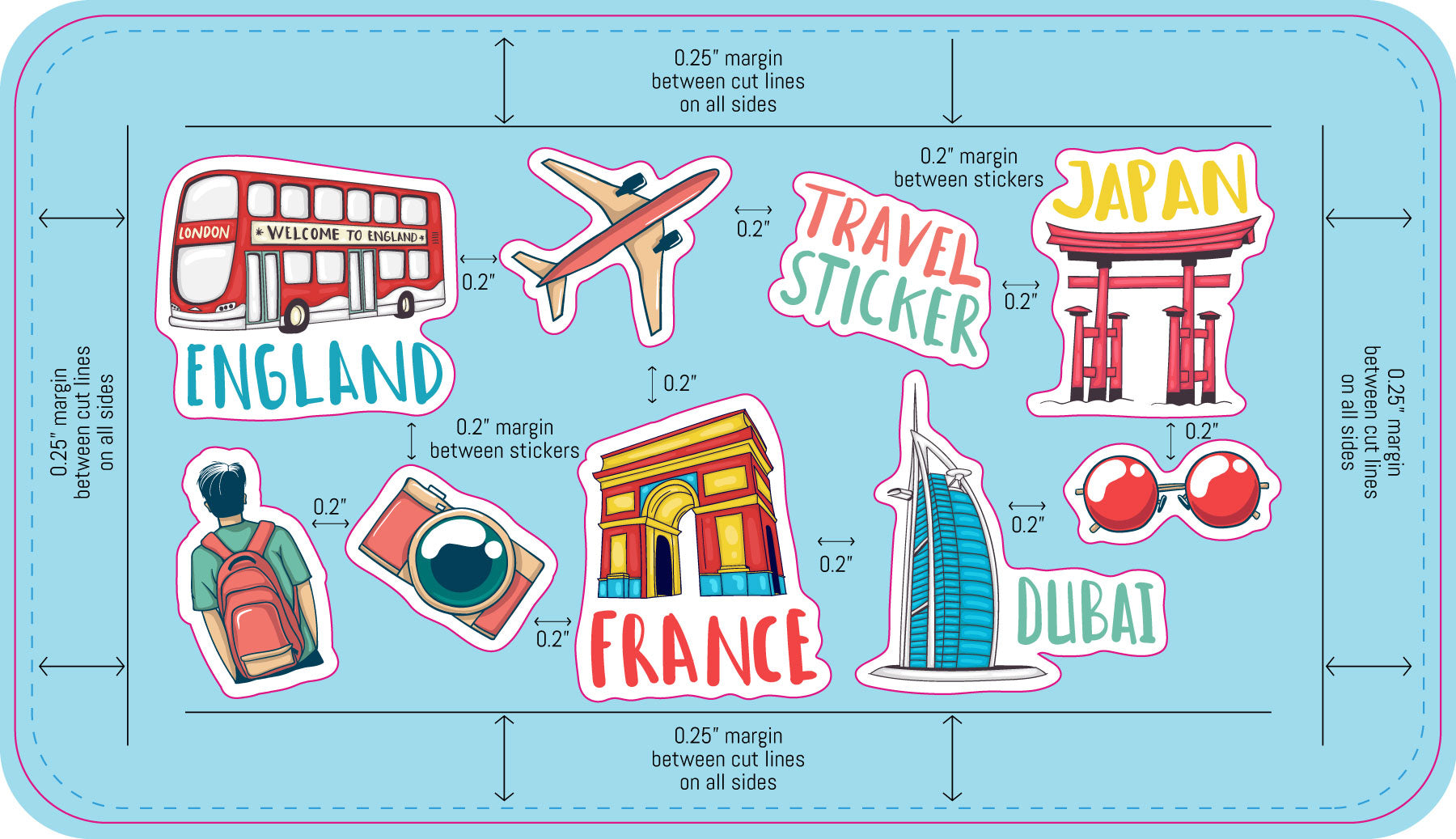
Sticker sheets let you print several different designs together on one backing sheet. Our sheet templates come pre-populated with placeholder artwork that you replace with your own files.
01
Create each design as its own file
Build every individual sticker separately and save each one as a PDF. Each file should already include its own bleed and safe area.
02
Open the sticker sheet template
Download the sheet template that matches your ordered size and open it in Illustrator.
03
Choose Replace at the prompt
A dialog will appear asking whether to Ignore, Replace, or Cancel. Check "Apply to all," then click Replace.
04
Select your PDF artwork
Point the dialog to your individual sticker PDF. The placeholder is swapped out and your design fills the position on the sheet.
05
Review and save
Confirm each design sits inside its own cut line with nothing overlapping, then save the finished sheet as a PDF and upload it with your order.
Sticker sheet artwork setup guideline

Common Mistakes to Avoid

The issues that most often send a file back for revision.

  • No bleed on the background – Artwork that stops at the die line leaves white edges when the cut shifts. Extend it a full 0.075 inch past the finished edge.
  • Text too close to the edge – Anything outside the safe area can be trimmed off. Pull text and logos at least 0.075 inch inside the die line.
  • Low-resolution images – Artwork saved from a website prints soft and pixelated. Work from the original high-resolution file whenever possible.
  • Live fonts not outlined – Fonts we don't have installed get substituted. Convert all type to outlines before exporting.
  • RGB color mode – Vivid RGB colors can't always be matched in CMYK. Design in CMYK to see accurate colors from the start.
  • Die line left in the artwork – The cut line is a guide, not a design element. Remove it or keep it on its own separate layer.
  • Wrong template size – Make sure the template you downloaded matches the size you actually ordered.

From File to Finished Print

What happens after you place your order.

1
Upload
Send your artwork with your order.
2
We Review
A designer checks size, bleed, and resolution.
3
Free Setup
We prepare the print file at no charge.
4
You Approve
We email you if anything needs a change.
5
We Print
Your order goes to press and ships out.
Ready to Set Up Your File?
Start from a free template with bleed and safe area already in place.