


Elevate Your Brand with Custom Holographic Stickers
Anti-Counterfeit, Branding & Packaging Labels

• Eye-Catching Holographic Effect
Custom holographic stickers shift through vibrant rainbow colors depending on the viewing angle, instantly increasing visual impact and perceived value.
• Ideal for Security & Premium Branding
Widely used for anti-counterfeit labels, authenticity seals, VOID tamper-evident stickers, premium packaging, and high-end branding.
• High-Resolution Eco-Solvent Printing (Not UV Printing)
Printed with an EPSON SureColor S80600L 10-color eco-solvent printer. Ink bonds smoothly into the film surface with no raised texture or cracking.
• White Ink Control for Readability
Supports CMYK, CMYK + White, or White-only printing. White ink blocks the holographic effect where needed, ensuring logos and text remain bold and legible.
• Durable for Indoor & Outdoor Use
Waterproof, scratch-resistant, and UV-resistant. Suitable for both indoor displays and outdoor applications.
What Are Holographic Stickers?
Holographic stickers use micro-structured holographic film to create a dynamic optical effect. As light hits the surface, it reflects, diffracts, and interferes with nano-scale patterns—producing shifting rainbow colors and a subtle 3D appearance.
This unique effect makes holographic stickers highly effective for brand protection, premium packaging, and eye-catching promotions.
Common Applications
-
Anti-Counterfeit & Security Labels
Print serial numbers, dates, or verification text to deter tampering and forgery. -
Premium Packaging & Branding
Ideal for cosmetics, liquor, electronics, and luxury goods. -
Promotional & Merchandise Stickers
Popular for artist merchandise, collectibles, and decorative branding.
Printing Technology & Quality
All holographic stickers are printed using a 10-color eco-solvent ink system, delivering excellent color depth and smooth finishes.
Unlike UV printing, solvent ink does not sit on top of the film, resulting in:
-
No raised ink layer
-
No brittle cracking
-
A refined, professional surface
They are also water-resistant and UV-resistant, making them reliable for real-world use.
Color Options & Print Modes
Available Colors
-
CMYK
-
CMYK + White
-
White Only
Print Layer Options
-
1 Layer: CMYK
-
1 Layer: White
-
2 Layer: CMYK + White
⚠️ Design Note:
Holographic film is not white. Printing CMYK without white ink allows the holographic base color to influence the final appearance, often making colors appear darker or metallic. White ink must be intentionally added where true color accuracy is required.
Design Tips for Best Results
-
Keep logos and text bold and simple for maximum readability
-
Use white ink or spot colors to separate important elements from the holographic background
-
Avoid thin lines or small text without white underprinting
Size, Shape & Finish
-
Digitally cut to any custom shape
-
Available in sizes from 1–5 inches (width & height)
-
Finished with a clear glossy laminate that enhances durability and amplifies the holographic effect
-
Medium-strength adhesive sticks to most surfaces with minimal residue upon removal
Why Choose Custom Holographic Stickers?
Custom holographic stickers are an exceptional way to make your brand stand out. These stickers catch the light and reflect vibrant colors, adding a unique dimension to your marketing materials. They attract attention, making them perfect for product promotions, events, or personal gifts. So, if you want your brand to shine, choosing custom holographic stickers is a smart decision.
Diverse Applications for Every Need
These stickers are not only visually appealing but also versatile. Businesses can use custom holographic stickers for packaging, promotional events, or even as giveaways. Schools and organizations often use them for awards or recognition, making them a popular choice. Because they serve a wide range of purposes, custom holographic stickers can boost visibility and engagement for anyone who uses them.
High-Quality and Customizable Options
We offer a variety of sizes, shapes, and finishes to suit your specific needs. Our custom holographic stickers are printed on high-quality materials to ensure durability and vibrant colors that capture attention. Additionally, you can incorporate your design, logo, or artwork, so they perfectly align with your branding strategy. This is why custom holographic stickers are a fantastic investment for anyone looking to enhance their visibility and appeal.
Design Templates That Make
Every File Print-Ready
Download free design templates for all RedPrinting products. Each template includes the correct trim size, bleed, and safe margin, so your artwork prints exactly the way you designed it.
Sticker Templates
Individually cut stickers in every shape and size, plus multi-design sticker sheets.
Business Card Templates
Standard, mini, and square formats for every card design.
Artwork Guidelines That Get
Every File Print-Ready
Every file submitted to RedPrinting is reviewed by a real person before it goes to press. This guide walks you through file formats, resolution, bleed, and cut lines — so your stickers, labels, and cards come out exactly the way you designed them.
Not a Designer? We'll Handle It
Free artwork setup is included with every order.
You don't need design software or print experience to order from us. Send us your image in any common format and our in-house design team will build the print file for you — adding bleed, positioning the cut line, and adjusting the resolution at no extra charge.
If your artwork needs a change we can't make on our own, we'll email you before printing. Nothing goes to press without your approval.
The Three Lines on Every Template
Understand these and your file will cut clean every time.

Accepted File Formats
Vector files give the sharpest results, but we accept high-resolution raster files too.
| Format | Type | Best For | Recommended |
|---|---|---|---|
| AI | Vector | Logos, text, line art, custom shapes | Best |
| Vector | Print-ready files with fonts outlined | Best | |
| EPS | Vector | Legacy vector artwork | Best |
| PSD | Raster | Layered photo-based designs | Good |
| PNG | Raster | Designs needing a transparent background | Good |
| JPG | Raster | Photographs and full-color images | Good |
| TIFF | Raster | High-quality scanned or photo artwork | Good |

- Outline your fonts – Convert all text to outlines or curves so typefaces render correctly on our end.
- Use CMYK color mode – Printing is a CMYK process. RGB files are converted automatically, and bright neon or vivid blues may shift slightly.
- Flatten transparency – Complex transparency and drop shadows can behave unpredictably; flatten them before exporting.
- Embed or attach linked images – Missing links are the most common reason a file gets sent back.
Image Resolution
300 DPI at final print size is the target.
Resolution is measured at the size the artwork will actually be printed. A 300 DPI image looks crisp on a 2-inch sticker but turns soft when stretched across a 24-inch poster. Always check the pixel dimensions against the finished size, not against how the file looks on screen.
Web images pulled from a website or social media are usually 72 DPI, which is roughly a quarter of the detail we need. Enlarging a low-resolution file doesn't add detail back — it only makes the softness more visible.
Low-quality artwork? Send it anyway. Our designers will do everything possible to bring it up to print standard, and we'll tell you honestly if a file won't hold up.

Choosing Your Material
Where the sticker will live decides which stock to use.
- Waterproof and tear-resistant
- Resists fading from sun and weather
- Holds up on bottles, laptops, and cars
- Higher cost per sticker
- Thin, smooth, and easy to write on
- Noticeably lower cost per sticker
- Ideal for packaging, boxes, and mailers
- Not water- or weather-resistant
Clear stickers are printed on transparent vinyl, so the surface underneath becomes part of the design. They're waterproof, tear-resistant, and work beautifully on glass bottles, cups, laptops, and windows where a white sticker edge would look out of place.
Because there's no white backing, light colors and white ink behave differently than they do on paper. Designs with bold shapes, dark colors, or deliberate negative space tend to read best.
Setting Up Sticker Sheets
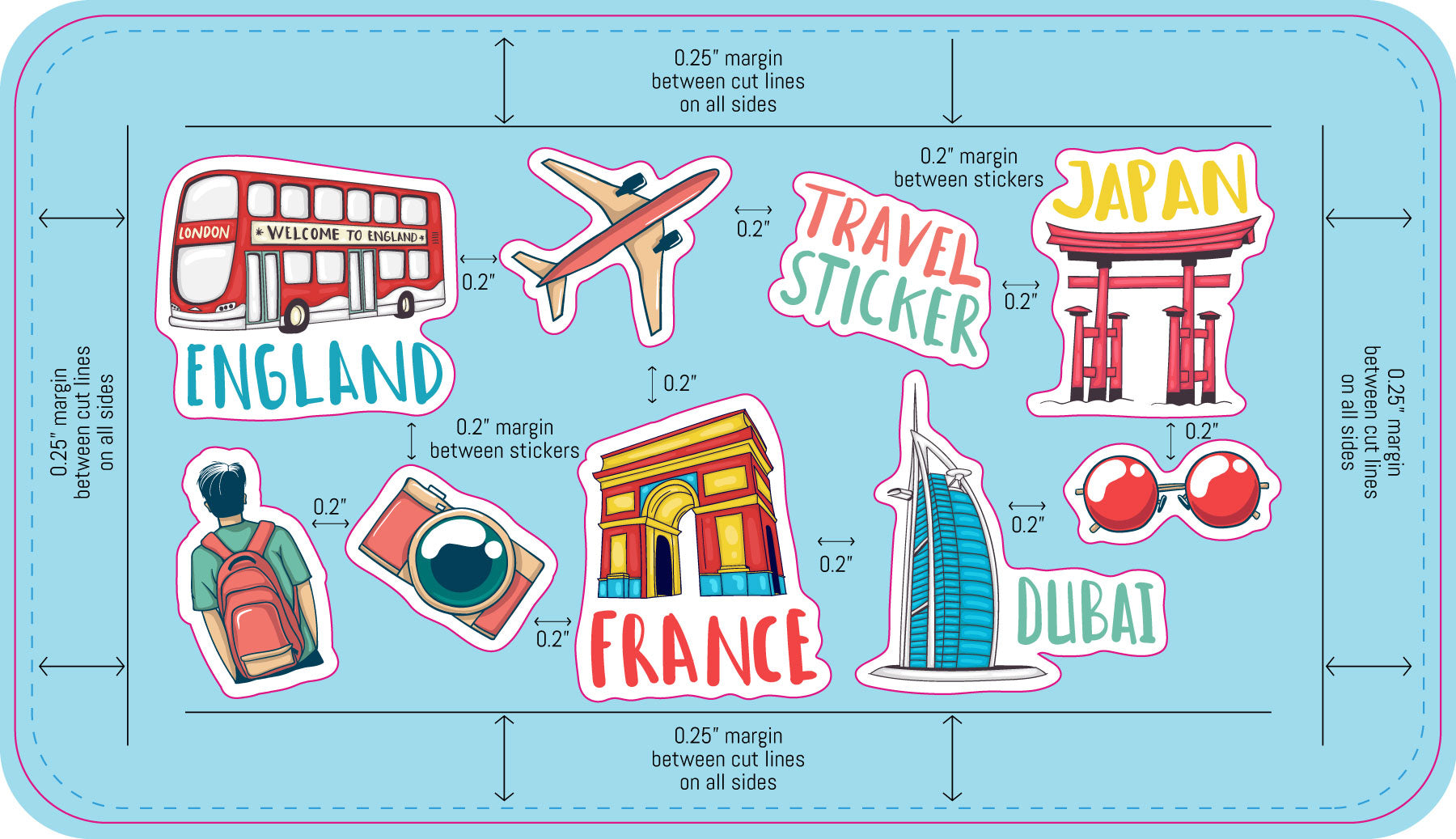
Multiple designs and sizes on a single sheet.
Sticker sheets let you print several different designs together on one backing sheet. Our sheet templates come pre-populated with placeholder artwork that you replace with your own files.
Common Mistakes to Avoid
The issues that most often send a file back for revision.
- No bleed on the background – Artwork that stops at the die line leaves white edges when the cut shifts. Extend it a full 0.075 inch past the finished edge.
- Text too close to the edge – Anything outside the safe area can be trimmed off. Pull text and logos at least 0.075 inch inside the die line.
- Low-resolution images – Artwork saved from a website prints soft and pixelated. Work from the original high-resolution file whenever possible.
- Live fonts not outlined – Fonts we don't have installed get substituted. Convert all type to outlines before exporting.
- RGB color mode – Vivid RGB colors can't always be matched in CMYK. Design in CMYK to see accurate colors from the start.
- Die line left in the artwork – The cut line is a guide, not a design element. Remove it or keep it on its own separate layer.
- Wrong template size – Make sure the template you downloaded matches the size you actually ordered.
From File to Finished Print
What happens after you place your order.